In the temporary variable method for swapping two variables in Python, a common approach involves the use of an additional variable to temporarily store the value of one of the variables. The process begins by assigning the original value of variable a to a temporary variable, typically named temp. Subsequently, the value of a is reassigned to the value of variable b. Finally, the temporary variable (temp) is assigned the original value of a, which was stored earlier. As a result of these assignments, the values of variables a and b are effectively swapped. This method ensures that the values are exchanged without the risk of losing any data, providing a straightforward and reliable way to achieve variable swapping in Python.
Source code
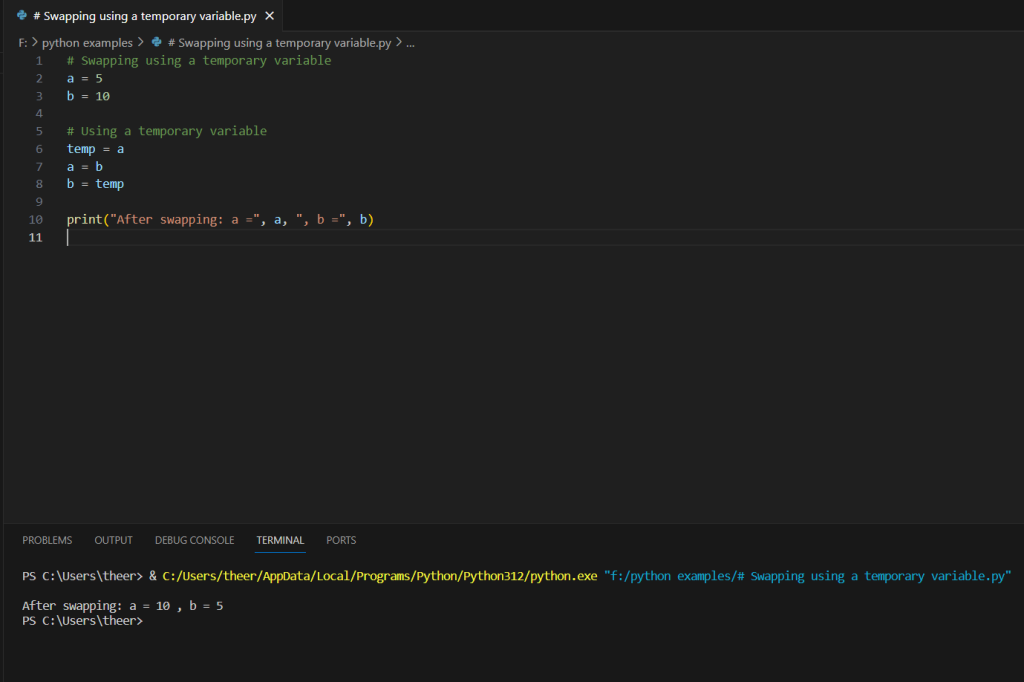
# Swapping using a temporary variable
a = 5
b = 10

# Using a temporary variable
temp = a
a = b
b = temp

print("After swapping: a =", a, ", b =", b)
Description
- Initialize Variables: Start by initializing the two variables you want to swap. For example:
a = 5 b = 10 - Create a Temporary Variable: Declare a temporary variable (commonly named
temp) and assign it the value of the first variable (ain this case):temp = a - Swap Values: Assign the value of the second variable (
b) to the first variable (a):a = b - Use Temporary Variable to Assign to the Second Variable: Assign the value stored in the temporary variable to the second variable (
b):b = temp - Result: After these assignments, the values of
aandbhave effectively swapped.print("After swapping: a =", a, ", b =", b)Running this code will display: “After swapping: a = 10 , b = 5”
This method uses a temporary variable to ensure that the original values are not lost during the swapping process. It’s a straightforward and widely used approach for variable swapping in many programming languages, including Python.
Screenshot