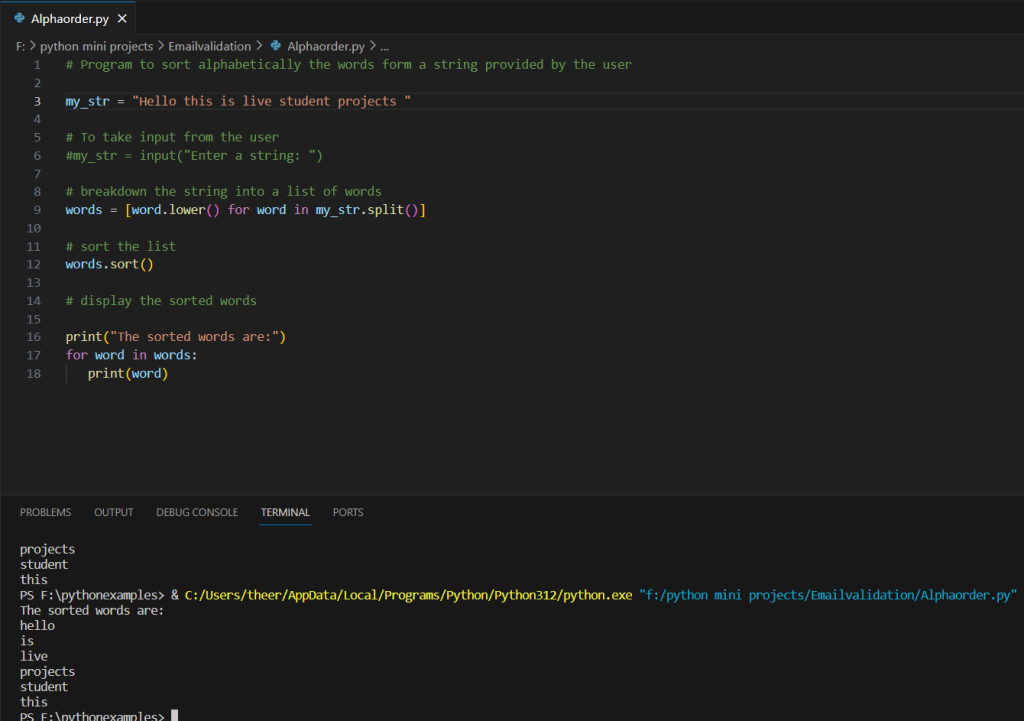
The provided Python code is a program designed to sort words alphabetically within a given string. The initial string, “Hello this is live student projects,” is utilized for demonstration purposes. The program first breaks down the string into a list of words, converting each word to lowercase to facilitate case-insensitive sorting. The list of words is then sorted alphabetically using the sort method, with a lambda function as the key parameter to consider the lowercase versions of the words. Finally, the program displays the sorted words in ascending order, maintaining the original case of the words as they appeared in the input string. Users can either use the provided example string or uncomment the input line to input their own string for sorting. The resulting output presents the words in sorted order, making the program a simple tool for arranging words alphabetically within a given input string.
Source code
my_str = "Hello this is live student projects "

# To take input from the user
#my_str = input("Enter a string: ")

# breakdown the string into a list of words
words = [word.lower() for word in my_str.split()]

# sort the list
words.sort()

# display the sorted words

print("The sorted words are:")
for word in words:
   print(word)
Description
Certainly! Here’s a step-by-step description of the provided Python code:
- Initialize the Input String:
my_str = "Hello this is live student projects "The program begins by initializing a sample string containing a series of words separated by spaces. This string will be used as input for the sorting operation.
- Commented Input Option:
   # To take input from the user
   # my_str = input("Enter a string: ")
This section is commented out, indicating that users can choose to input their own string interactively by uncommenting this line and providing input when prompted.
- Split the String into Words:
words = my_str.split()The split() method is used to break down the input string into a list of individual words. By default, it splits the string wherever there is a space.
- Convert Words to Lowercase:
words = [word.lower() for word in words]A list comprehension is employed to convert each word in the list to lowercase. This step ensures that the sorting will be case-insensitive.
- Sort the List of Words:
words.sort(key=lambda x: x.lower())The sort() method is used to arrange the words in alphabetical order. The key parameter specifies a lambda function that returns the lowercase version of each word, enabling a case-insensitive sort.
- Display the Sorted Words:
   print("The sorted words are:")
   for word in words:
       print(word)
Finally, the program prints the sorted words one by one. The output will display the words in alphabetical order, considering their lowercase forms for sorting.
Overall, this program provides a simple and effective way to sort words alphabetically within a given string, with the option for user input.
Screenshot