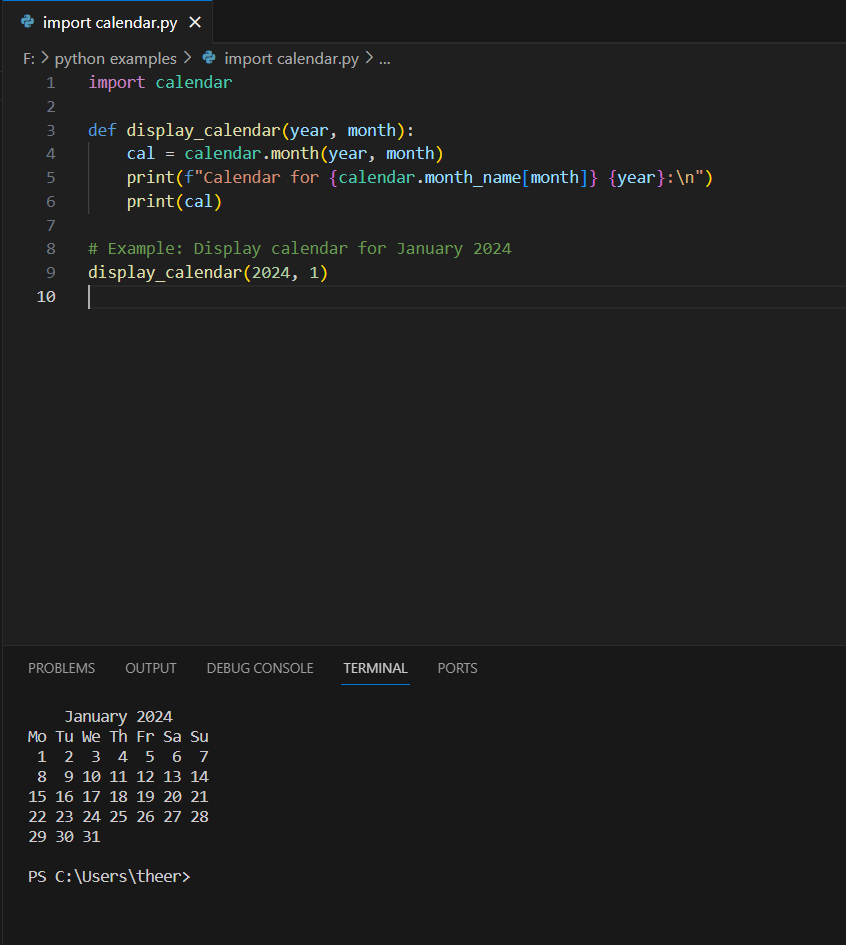
The provided Python program utilizes the calendar module to display a calendar for a specified month and year. The display_calendar function takes two parameters, namely year and month, and uses them to generate and print a formatted calendar for the specified month. Inside the function, the calendar.month() function is employed to obtain the calendar as a string, and it is then printed with a header indicating the month and year. In the example given, the program displays the calendar for January 2024. Users can easily customize the input arguments to showcase calendars for different months and years as needed. The calendar module in Python offers various functionalities for working with dates and calendars, making it a versatile tool for handling calendar-related operations.
Source code
import calendar

def display_calendar(year, month):
    cal = calendar.month(year, month)
    print(f"Calendar for {calendar.month_name[month]} {year}:\n")
    print(cal)

# Example: Display calendar for January 2024
display_calendar(2024, 1)
Description
Certainly! Let’s break down the provided Python code step by step:
- Importing the
calendarModule:import calendarThe code begins by importing thecalendarmodule, which provides functionalities to work with calendars in Python. - Defining the
display_calendarFunction:def display_calendar(year, month):Thedisplay_calendarfunction is defined, taking two parameters –yearandmonth. - Generating Calendar and Printing Header:
cal = calendar.month(year, month) print(f"Calendar for {calendar.month_name[month]} {year}:\n")Inside the function, thecalendar.month()function is used to generate a formatted calendar for the specifiedyearandmonth. The header indicating the month and year is printed using an f-string. - Printing the Calendar:
print(cal)The generated calendar is then printed to the console. - Example Usage:
python display_calendar(2024, 1)
Finally, an example usage of thedisplay_calendarfunction is demonstrated by calling it with the arguments2024for the year and1for the month, which corresponds to January. This showcases the calendar for January 2024.
By modifying the arguments when calling the function, users can easily display calendars for different months and years. The code provides a simple yet effective way to visualize calendars using Python’s built-in calendar module.
Screenshot