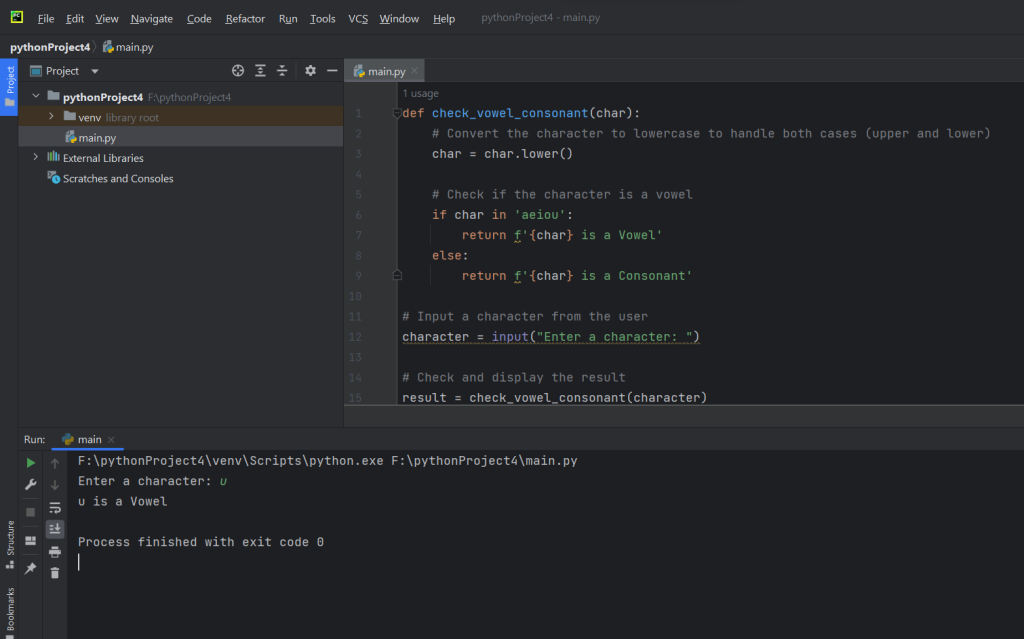
The provided Python program is designed to determine whether a given character is a vowel or a consonant. It defines a function called check_vowel_consonant that takes a character as input. The function first converts the character to lowercase to ensure case-insensitivity. It then checks whether the character is present in the set of vowels (‘a’, ‘e’, ‘i’, ‘o’, ‘u’). If the character is found in the set of vowels, the function returns a string indicating that the character is a vowel; otherwise, it declares the character as a consonant. In the main part of the program, the user is prompted to enter a character. The program then calls the check_vowel_consonant function with the user-inputted character and prints the result to the console, providing information on whether the entered character is a vowel or a consonant. The program offers a straightforward way to analyze individual characters for their vowel or consonant status.
Source code
def check_vowel_consonant(char):
    # Convert the character to lowercase to handle both cases (upper and lower)
    char = char.lower()

    # Check if the character is a vowel
    if char in 'aeiou':
        return f'{char} is a Vowel'
    else:
        return f'{char} is a Consonant'

# Input a character from the user
character = input("Enter a character: ")

# Check and display the result
result = check_vowel_consonant(character)
print(result)
Description
- Function Definition:
- The program defines a function named
check_vowel_consonantthat takes a single parameter,char, representing a character.
- The program defines a function named
- Character Case Normalization:
- Within the function, the
charparameter is converted to lowercase using thelower()method. This step ensures that the program is case-insensitive when checking for vowels.
- Within the function, the
- Vowel Check:
- The program then checks whether the lowercase character is present in the set of vowels (‘a’, ‘e’, ‘i’, ‘o’, ‘u’) using the
inkeyword.
- The program then checks whether the lowercase character is present in the set of vowels (‘a’, ‘e’, ‘i’, ‘o’, ‘u’) using the
- Return Statement:
- If the character is found in the set of vowels, the function returns a string indicating that the character is a vowel. Otherwise, it returns a string declaring the character as a consonant.
- User Input:
- In the main part of the program, the user is prompted to enter a character using the
inputfunction. The entered character is stored in the variable namedcharacter.
- In the main part of the program, the user is prompted to enter a character using the
- Function Invocation:
- The program calls the
check_vowel_consonantfunction with the user-inputted character as an argument. The result is stored in the variable namedresult.
- The program calls the
- Print Result:
- Finally, the program prints the result to the console using the
printfunction. The result provides information on whether the entered character is a vowel or a consonant.
- Finally, the program prints the result to the console using the
- Program Execution:
- When the program is run, the user is prompted to input a character, and based on the function’s logic, it determines and prints whether the entered character is a vowel or a consonant. The conversion to lowercase allows the program to handle both uppercase and lowercase characters uniformly.
Screenshot