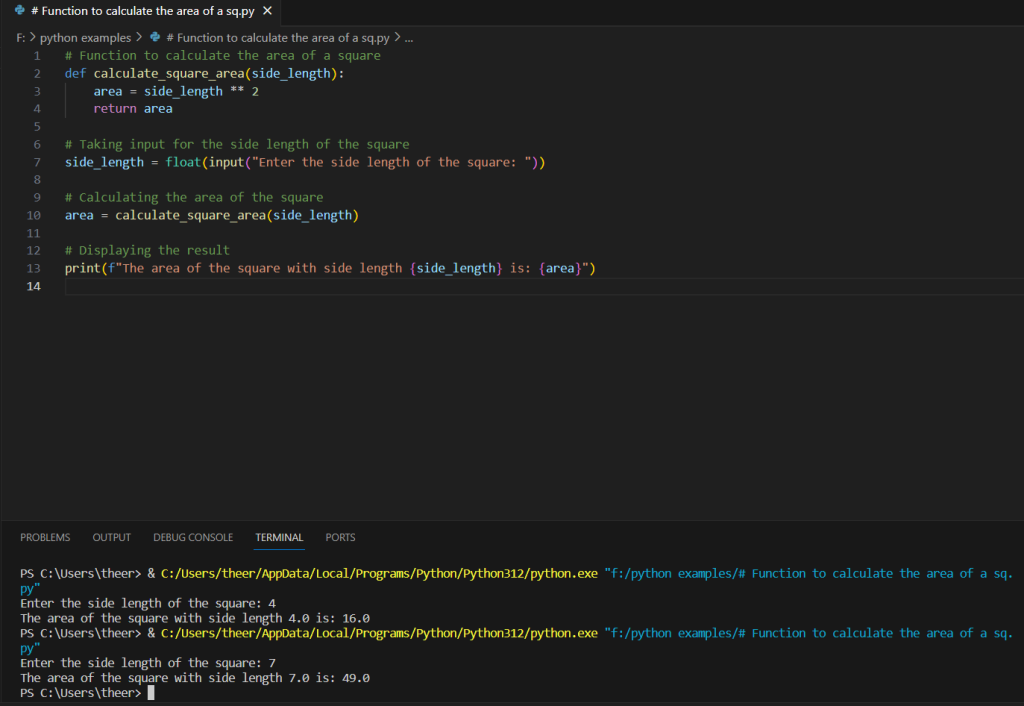
The provided Python code is a simple program designed to calculate the area of a square based on user input for the side length. The program starts by defining a function named calculate_square_area, which takes a single parameter, side_length. Inside the function, the area of the square is calculated by squaring the side length. The program then prompts the user to input the side length of the square using the input function, converting the input to a floating-point number. It calls the calculate_square_area function with the user-provided side length, calculates the area, and finally prints the result. The output includes a formatted string that displays both the user-provided side length and the calculated area of the square. This code serves as a basic example of user input, function definition, and mathematical computation in Python for calculating the area of a square.
Source code
# Function to calculate the area of a square
def calculate_square_area(side_length):
area = side_length ** 2
return area
# Taking input for the side length of the square
side_length = float(input(“Enter the side length of the square: “))
# Calculating the area of the square
area = calculate_square_area(side_length)
# Displaying the result
print(f”The area of the square with side length {side_length} is: {area}”)
Description
- Function Definition:
def calculate_square_area(side_length):The code starts by defining a function namedcalculate_square_areathat takes a single parameterside_length, representing the length of one side of the square. - Area Calculation:
area = side_length ** 2Inside the function, the area of the square is calculated by squaring theside_length. This is done using the exponentiation operator**. - User Input:
side_length = float(input("Enter the side length of the square: "))The program prompts the user to input the side length of the square using theinputfunction. The input is then converted to a floating-point number usingfloat(). - Function Invocation:
area = calculate_square_area(side_length)Thecalculate_square_areafunction is called with the user-providedside_length, and the result is stored in the variablearea. - Result Display:
print(f"The area of the square with side length {side_length} is: {area}")Finally, the program prints the calculated area using a formatted string. It displays both the user-provided side length and the corresponding area of the square.
In summary, the code defines a function for calculating the area of a square, takes user input for the side length, calculates the area using the function, and then prints the result along with the original side length in a human-readable format.
Screenshot