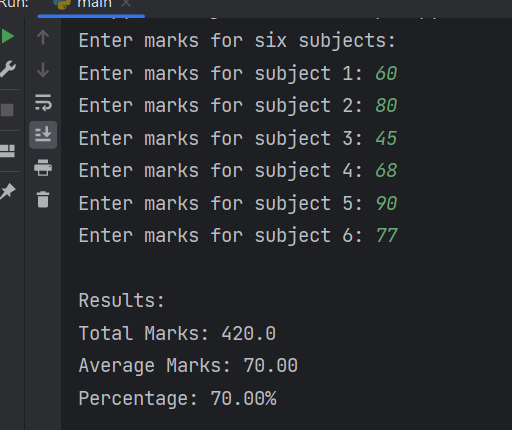
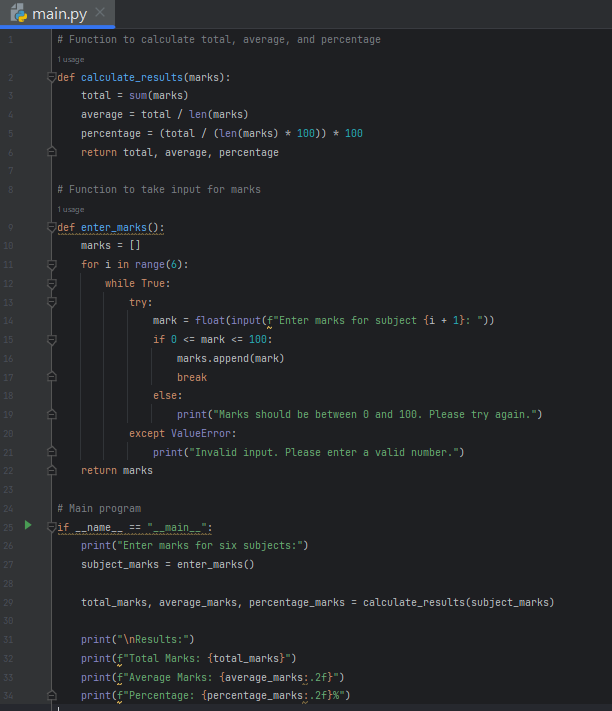
The Python program is designed to facilitate the calculation and display of total marks, average marks, and percentage for six subjects based on user input. The program prompts the user to enter marks for each subject, enforcing validation to ensure the entered marks are numeric and within the acceptable range of 0 to 100. It defines two functions: calculate_results for computing the total, average, and percentage, and enter_marks to handle user input. The former uses standard mathematical operations to derive the required metrics, while the latter employs a loop and exception handling to ensure the validity of user input. In the main program section, the script checks if it is run directly, calls the input function to collect marks, and then utilizes the calculation function to determine and print the total marks, average marks (rounded to two decimal places), and the percentage. This program provides a straightforward tool for assessing academic performance across multiple subjects.
Source code
# Function to calculate total, average, and percentage
def calculate_results(marks):
    total = sum(marks)
    average = total / len(marks)
    percentage = (total / (len(marks) * 100)) * 100
    return total, average, percentage

# Function to take input for marks
def enter_marks():
    marks = []
    for i in range(6):
        while True:
            try:
                mark = float(input(f"Enter marks for subject {i + 1}: "))
                if 0 <= mark <= 100:
                    marks.append(mark)
                    break
                else:
                    print("Marks should be between 0 and 100. Please try again.")
            except ValueError:
                print("Invalid input. Please enter a valid number.")
    return marks

# Main program
if __name__ == "__main__":
    print("Enter marks for six subjects:")
    subject_marks = enter_marks()

    total_marks, average_marks, percentage_marks = calculate_results(subject_marks)

    print("\nResults:")
    print(f"Total Marks: {total_marks}")
    print(f"Average Marks: {average_marks:.2f}")
    print(f"Percentage: {percentage_marks:.2f}%")
Description
- Function
calculate_results(marks)- This function takes a list of marks as its parameter (
marks). - It calculates the total sum of the marks using the
sum()function. - Computes the average by dividing the total by the number of subjects.
- Calculates the percentage by dividing the total by the maximum possible total marks (assuming 100 marks per subject) and multiplying by 100.
- Returns the total, average, and percentage as a tuple.
- This function takes a list of marks as its parameter (
- Function
enter_marks()- This function is responsible for taking input for the marks of six subjects.
- It initializes an empty list called
marksto store the marks. - It uses a loop to iterate over each subject (six subjects in total).
- Inside the loop, it uses a
try-exceptblock to handle input validation:- It attempts to convert the input to a float.
- If successful, it checks if the entered mark is between 0 and 100.
- If the mark is valid, it appends it to the
markslist and breaks out of the loop. - If the input is invalid (not a number or not in the valid range), it displays an appropriate error message and prompts the user to try again.
- Returns the list of marks.
- Main Program (
if __name__ == "__main__":)- Checks if the script is being run directly (not imported as a module).
- Invokes the
enter_marksfunction to get the list of marks from the user. - Calls the
calculate_resultsfunction with the obtained marks. - Prints the results, including the total marks, average marks (rounded to two decimal places), and the percentage.
- Execution Flow:
- The program starts by taking input for the marks using the
enter_marksfunction. - The entered marks are then passed to the
calculate_resultsfunction to obtain the total, average, and percentage. - Finally, the results are printed to the console.
- The program starts by taking input for the marks using the
Screenshot
Output